
A data project cannot be a gamble.
Our MDM (Master Data Management) implementation methodology combines PMBOK with agile practices: five phases, formalized milestones, sprints with visible delivery and weekly communication. You know where the project stands, what comes next and what depends on you.
160 clients trust us












Method
PMBOK with agile practices, in sprints
Rhythm
Weekly status report and daily follow-up
Control
Schedule and S-curve visible to the client in real time
Formalization
Every milestone documented and accepted in writing
The five phases
From the first email to the closure statement, with a formal milestone at every turn.
Open each phase to see the activities, the deliverables and what we expect from your team.
Welcome and start checklist. Structured collection of the project's critical information, with an introduction to 4MDG and the team that will serve you.
Start meeting. Team introduced, contracted scope reviewed and expectations aligned with all parties.
As-Is and To-Be mapping. The consultant runs the meetings to understand the current process and design the future one, already identifying improvement opportunities.
Integration meeting. Assessment of the systems involved, the complexity of each integration and the time required for each one.
Environment created. Client tenant provisioned in UAT, with access, VPN and SSO domain requests.
Project plan. With all the initiation information in hand, the PMO builds the plan and the detailed schedule.
Validation and sign-off. The plan is presented to you, reviewed and formalized by email. Without sign-off, the project does not move forward.
Kick-off. Meeting to present the plan to everyone involved, marking the official start of execution.
Scenario mapping and workflow build. Business scenarios become a configured flow, validated by all areas before moving on.
Configuration and development. Reference databases, rules, notifications, IDOC and JSON parameterization, and integration with the legacy ERP, via API or file.
Testing. Unit tests run by 4MDG and by you, followed by integrated tests. Approval of the integrated tests is a critical milestone to move on.
Cutover and migration. Production environment preparation, deploy, post-deploy validation and execution of data loads.
Go-live. Smoke test, official communication and assisted operation in the first weeks.
Data cleansing, when contracted. Database received, validation flow presented, standardization executed and delivery in monthly batches until final consolidation.
Daily tracking. PMO and project manager monitor progress in Artia and hold internal meetings to spot deviations early.
Risk management. Risks documented, categorized and tracked until mitigation, with immediate corrective action when the deviation is critical.
Weekly or biweekly status report. Progress against the schedule, risks and issues, upcoming activities, critical dependencies and required adjustments, always documented.
Change control. Every new request is recorded and assessed for impact on scope, cost and deadline before it is taken in.
Monitored milestones. Kick-off, workflow approval, IDOC/JSON configuration, integrated test approval, cutover plan and go-live formalization.
Assisted operation. Close support in the first weeks of production, until the operation stabilizes.
Closing meeting. Lessons learned recorded and structured transition to the ongoing support team.
Closure statement. Formalization of the rollout and your sign-off.
Sustainment. From then on, access to the admin portal lets your team create new flows, screens and fields without depending on a project.
Project milestones
Each milestone is documented and formalized in writing.
01
Kick-off
Plan presented and schedule accepted.
02
Workflow approved
The designed flow is validated by all areas.
03
IDOC / JSON
Integration mapping configured and checked.
04
Integrated testing
Critical milestone: no approval, no cutover.
05
Cutover plan
Environment, data loads and cutover window defined.
06
Go-live
Smoke test, official communication and assisted operation.

Schedule, closed activities and the S-curve are visible to the client in real time, not only at the monthly meeting.
Team and roles
Who does what, defined before we start.
A RACI matrix agreed during planning avoids the most expensive question in any project: whose task was that?
PMO
Leads project management, ensures methodological compliance, controls risks and formalizes each milestone.
Project manager
Runs day-to-day execution, tracks the schedule and is the single point of escalation.
Consultants
Lead the implementation, configure the platform and support change management in each area.
Technology team
Responsible for the technical configuration and for integrations with the ERP and other systems.
Client key users
Validate deliverables, test the flows and spread knowledge internally.
Data cleansing manager
When cleansing is contracted, leads the standardization and quality of the delivered base.
What we expect from your team
Active participation in mapping meetings and testing, feedback within the agreed deadlines, and immediate communication of any risk. Data projects are delayed by a lack of decisions, rarely by a lack of technology.
Communication and change management
Technology moves in fast. Habits take longer.
Master data is a people process. That is why the rollout treats communication and adoption as a deliverable, not as a consequence.
Structured meetings. Kick-off, status reports, go/no-go and closing, each with an agenda and a record.
Defined channels. Teams for the day-to-day, email for formalization, SharePoint for documents and WhatsApp for what is urgent.
Training. Key user training and access to the MDM Academy, so that governance stays alive after the project ends.

After go-live
The project ends. The follow-up doesn't.
Two internal applications sustain the client's life after implementation. Mapping takes care of the environment: it documents the process, compares staging with production and monitors integrations. Prisma takes care of the relationship: it is the Customer Success platform 4MDG built for itself.
4MDG Mapping · the environment
Documentation generated from the real configuration, comparison between environments before the deploy, quality audit of the flow with a score before go-live, and monitoring of integrations and queries with alerts by e-mail and webhook.
In practice: integration failures and usage overruns alert us before they stop your team.
See Mapping in detail →Prisma · the relationship
Internal Customer Success platform with a composite health score, recorded meeting cadence, NPS and CSAT surveys, and an AI layer that cross-references it all and prioritizes action.
It is not a product in our portfolio: it is the tool that ensures no signal from your team goes unnoticed.
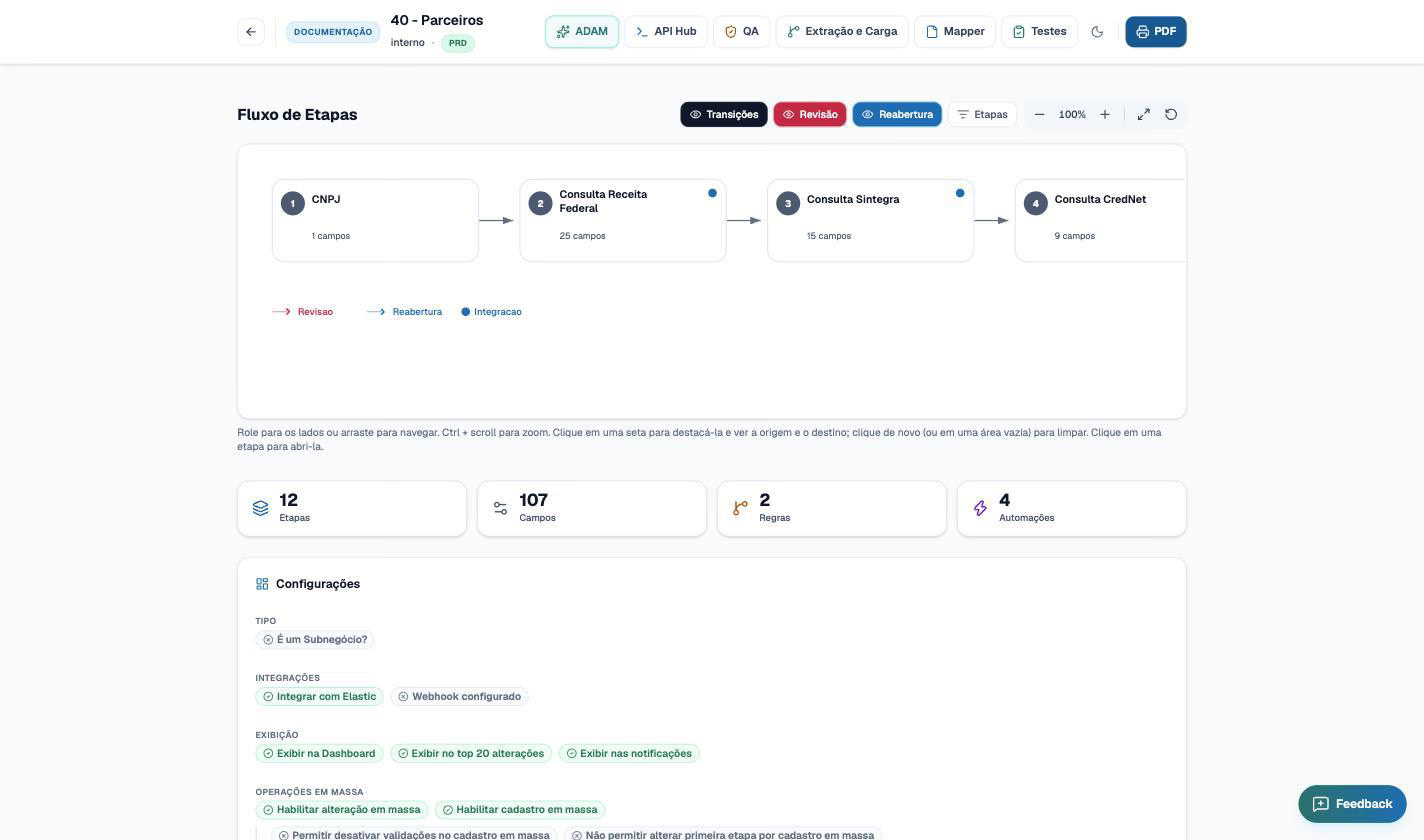
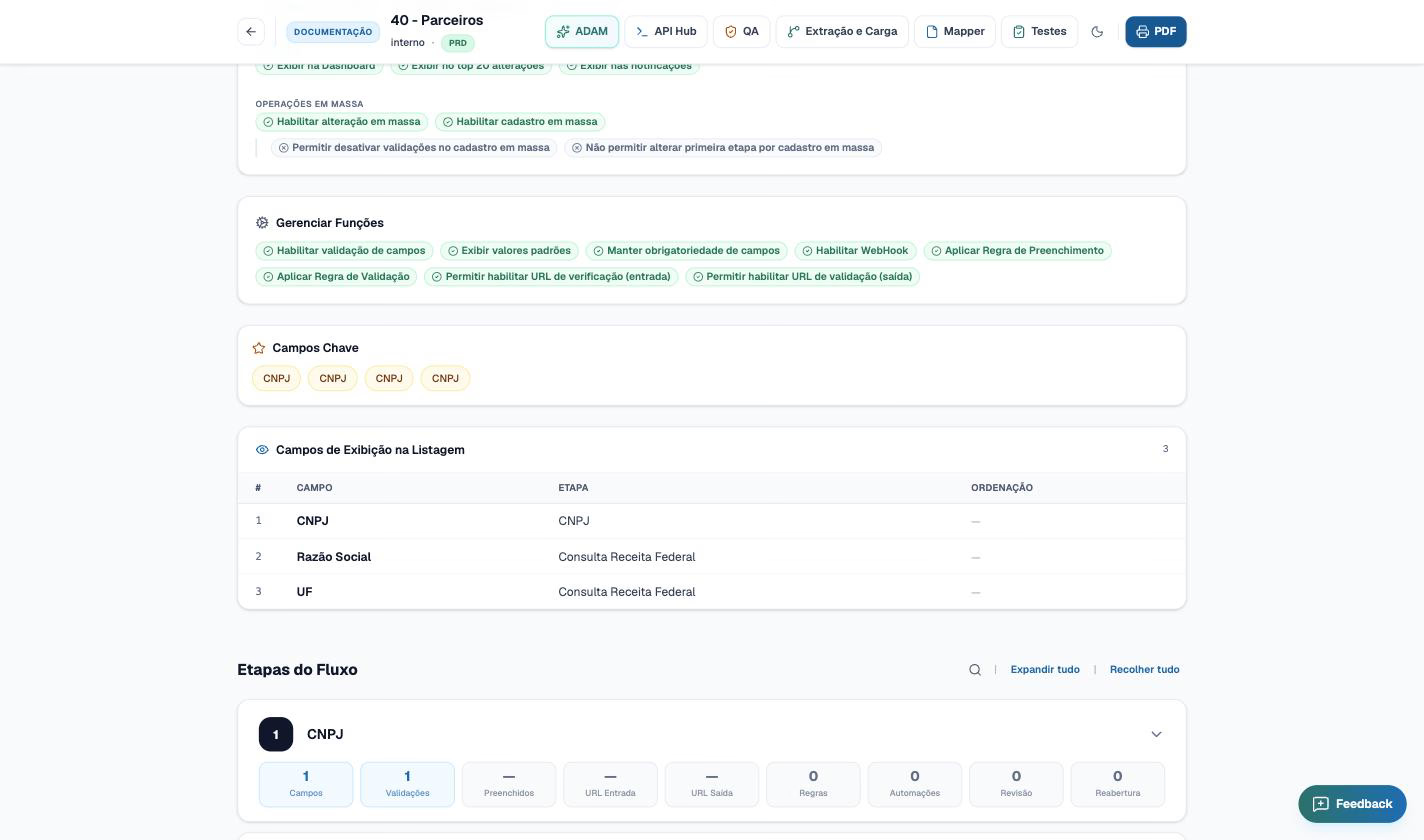
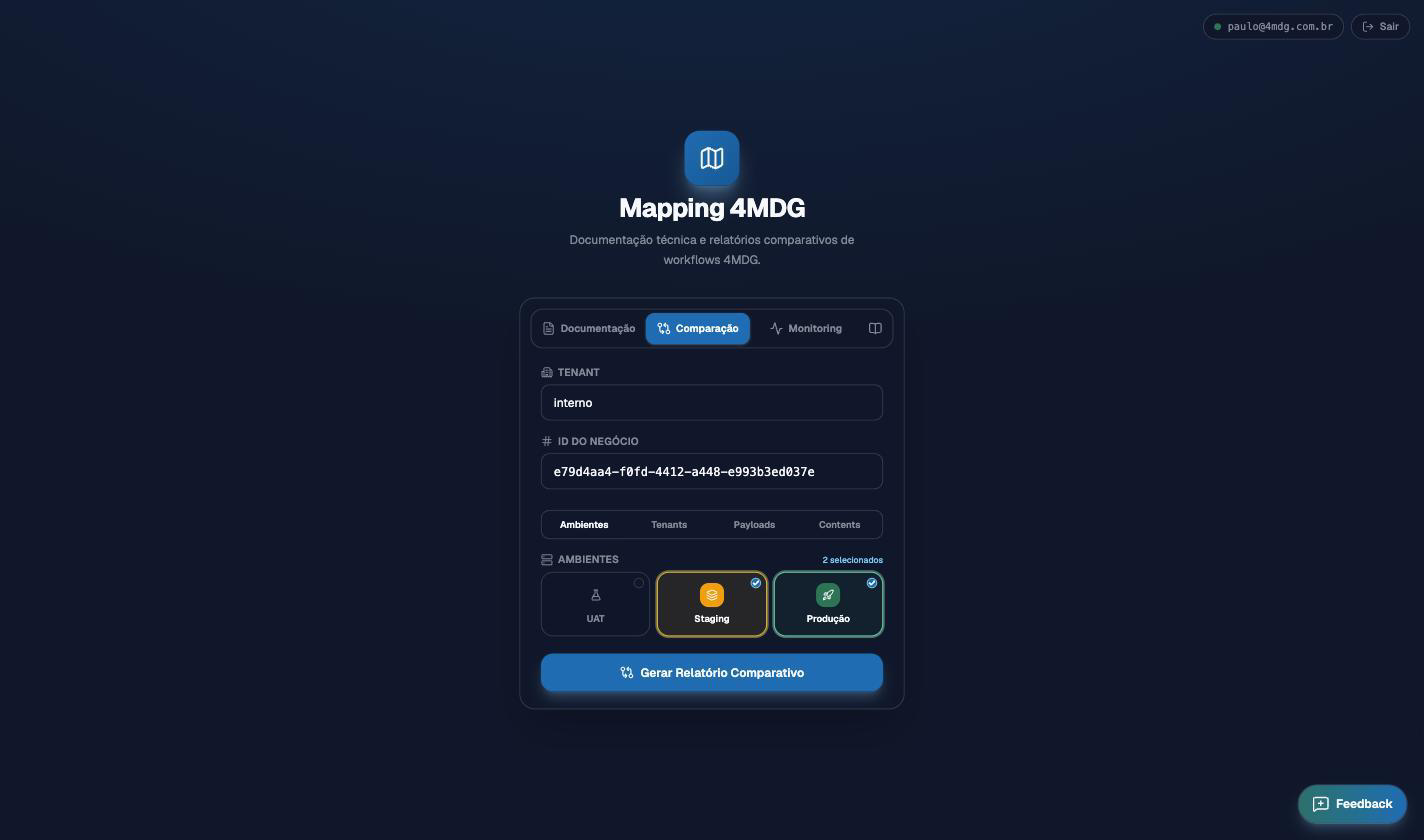
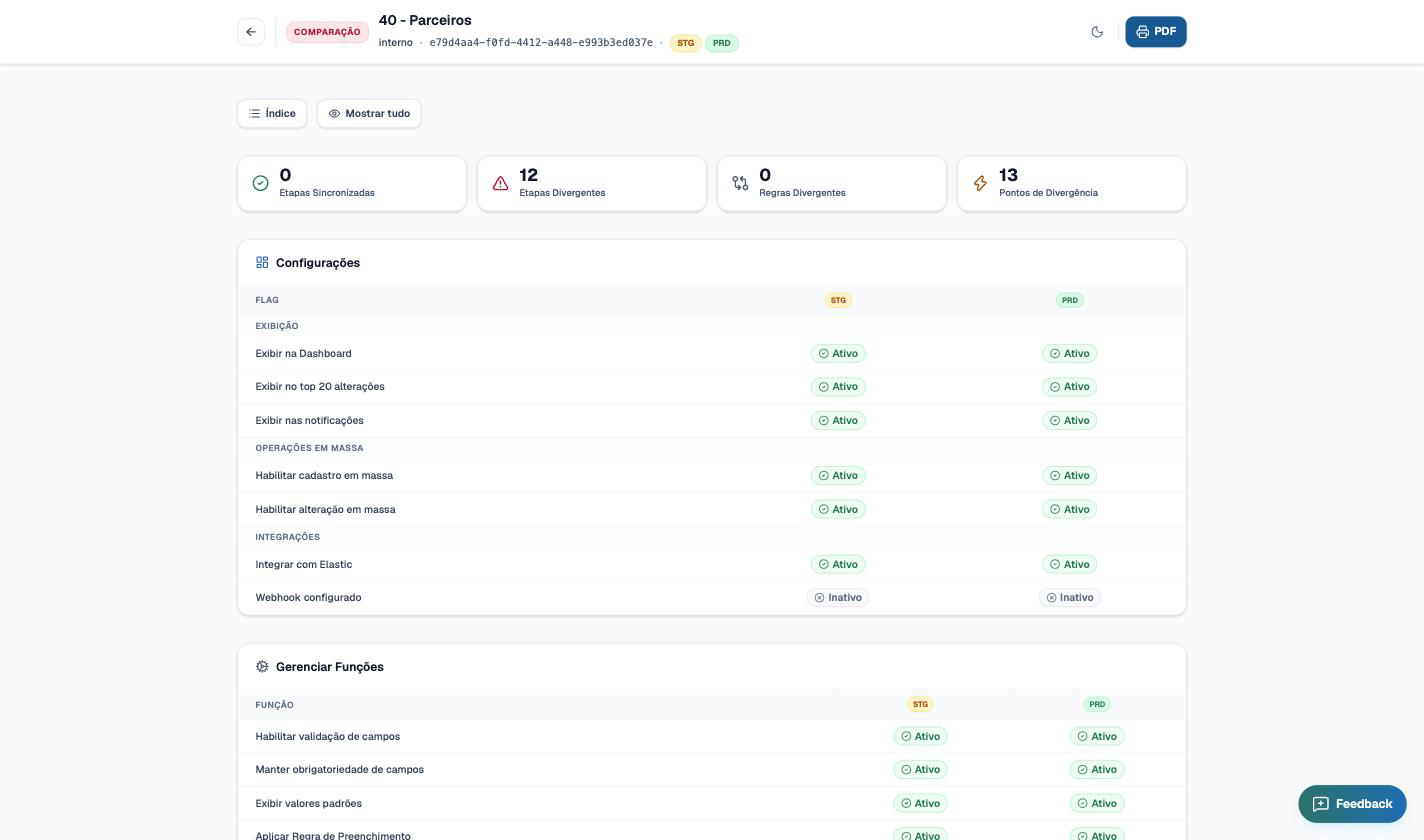
Mapping · environment screens · 1 of 8
01
Stage flow
The configured process becomes a navigable diagram, read live from the environment: stages, transitions, review and integration points.
02
Business context
Active settings, key fields and data profiling of the entries, without exporting anything from the base.
03
Comparison between environments
Staging against production, paired by GUID, with divergences in plain sight before the deploy.
04
Comparative report
Divergent stages and rules counted and located. In practice, it is the deploy task list.
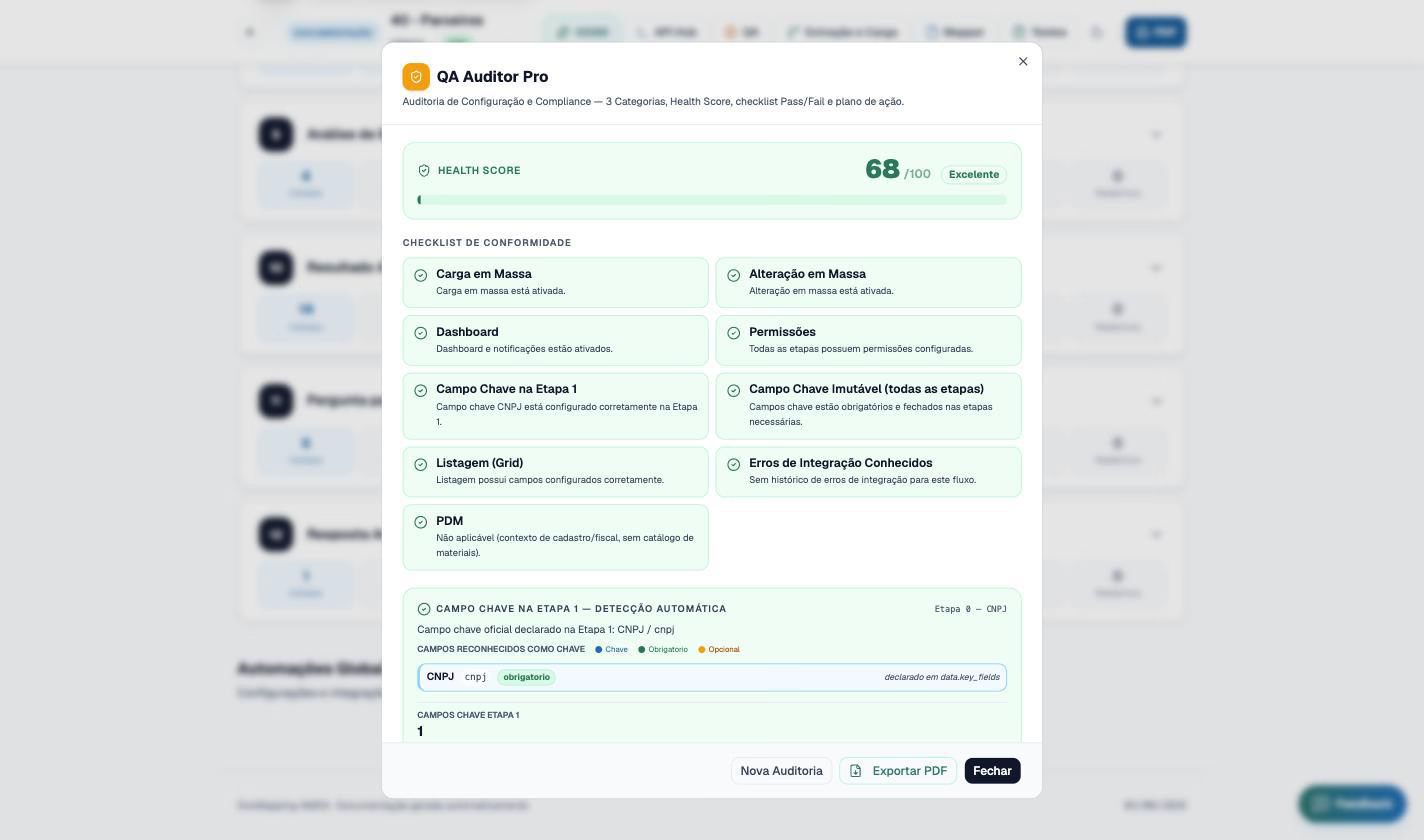
05
Quality audit
A score from 0 to 100 for the process before go-live, with a checklist of configuration, mapping, governance and integration.
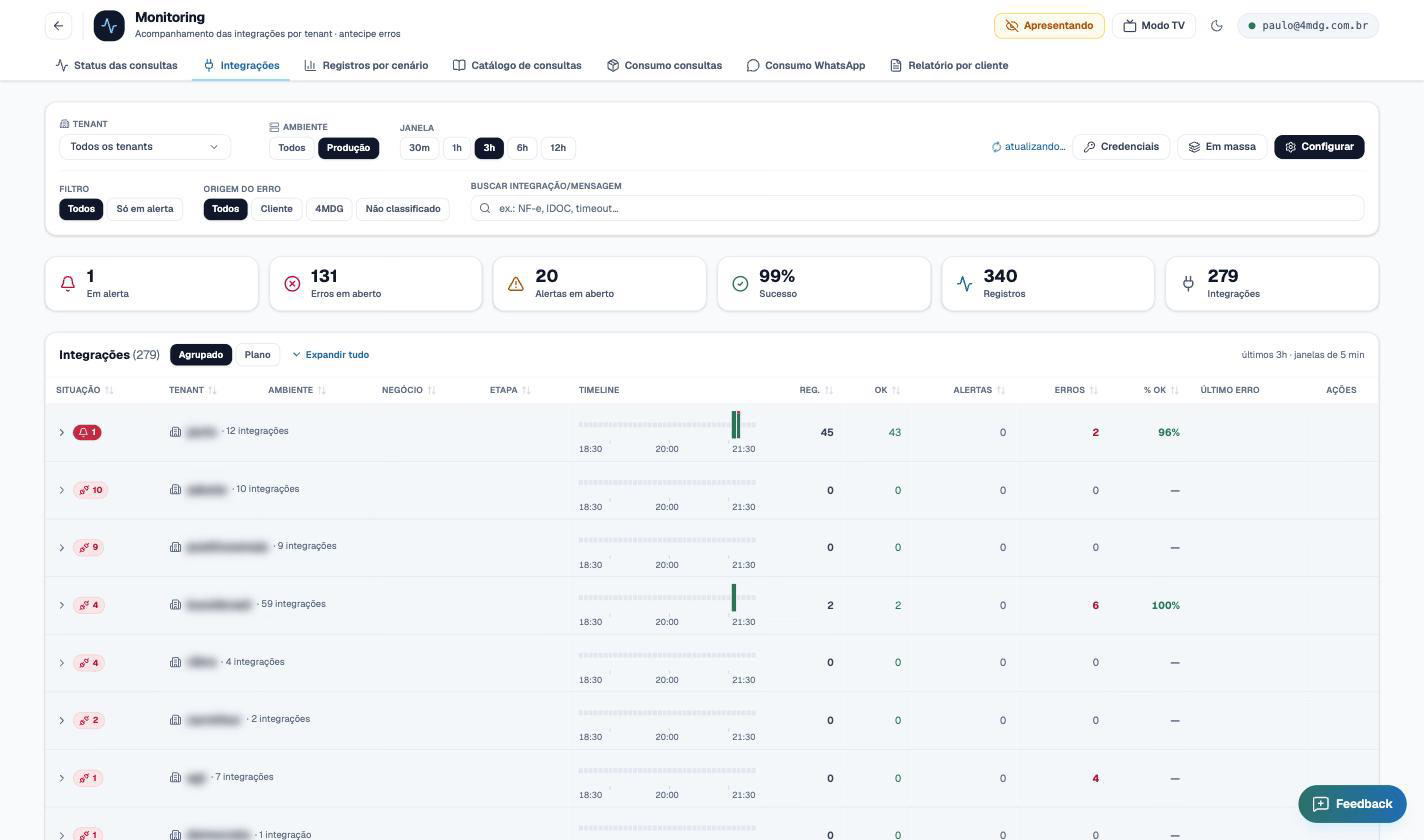
06
Monitoring · integrations
Status by integration, open errors and alerts, error origin and success rate in the period.
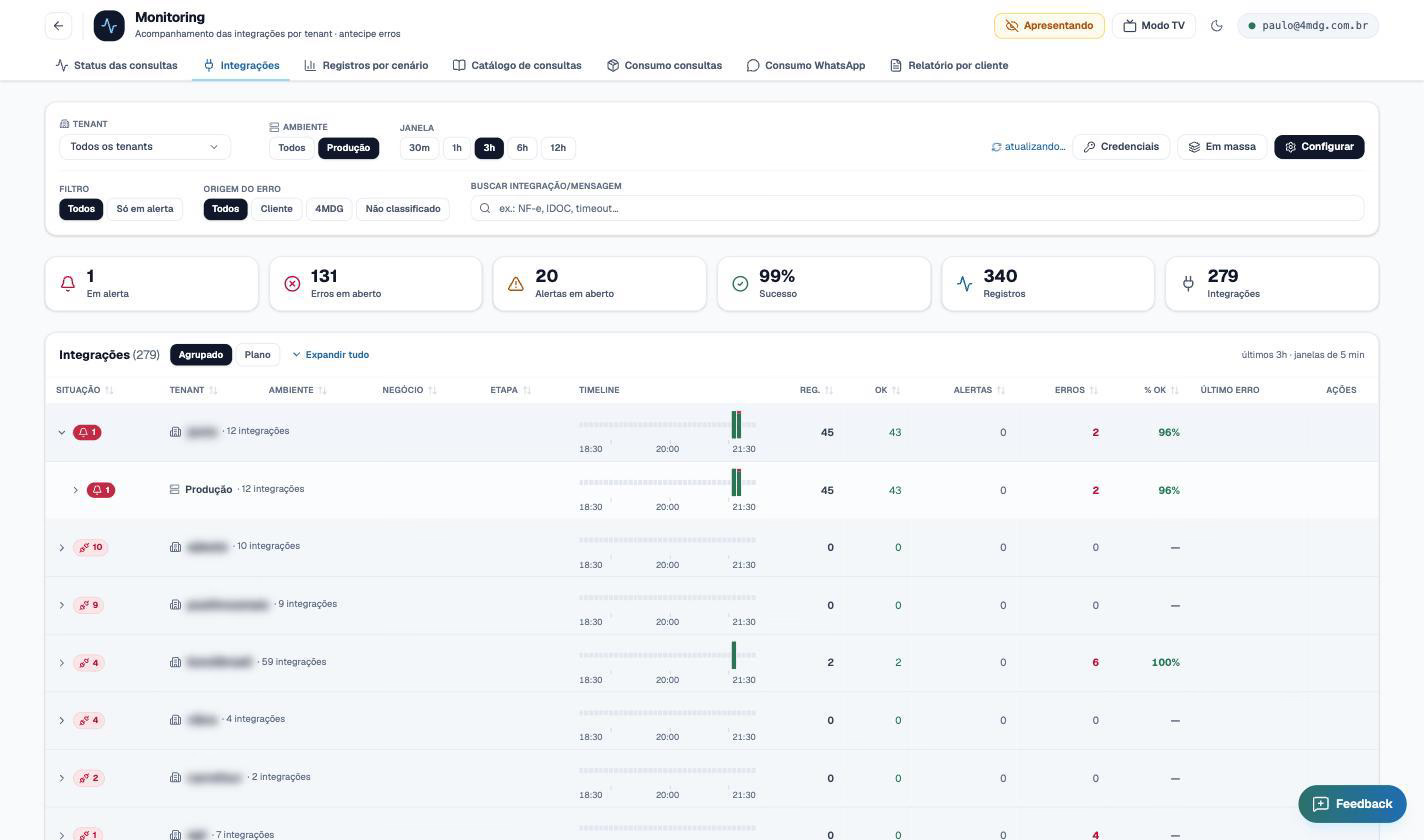
07
Monitoring · drill-down
From the panel to the blocked record in three clicks, with AI-suggested fixes and reprocessing upon confirmation.
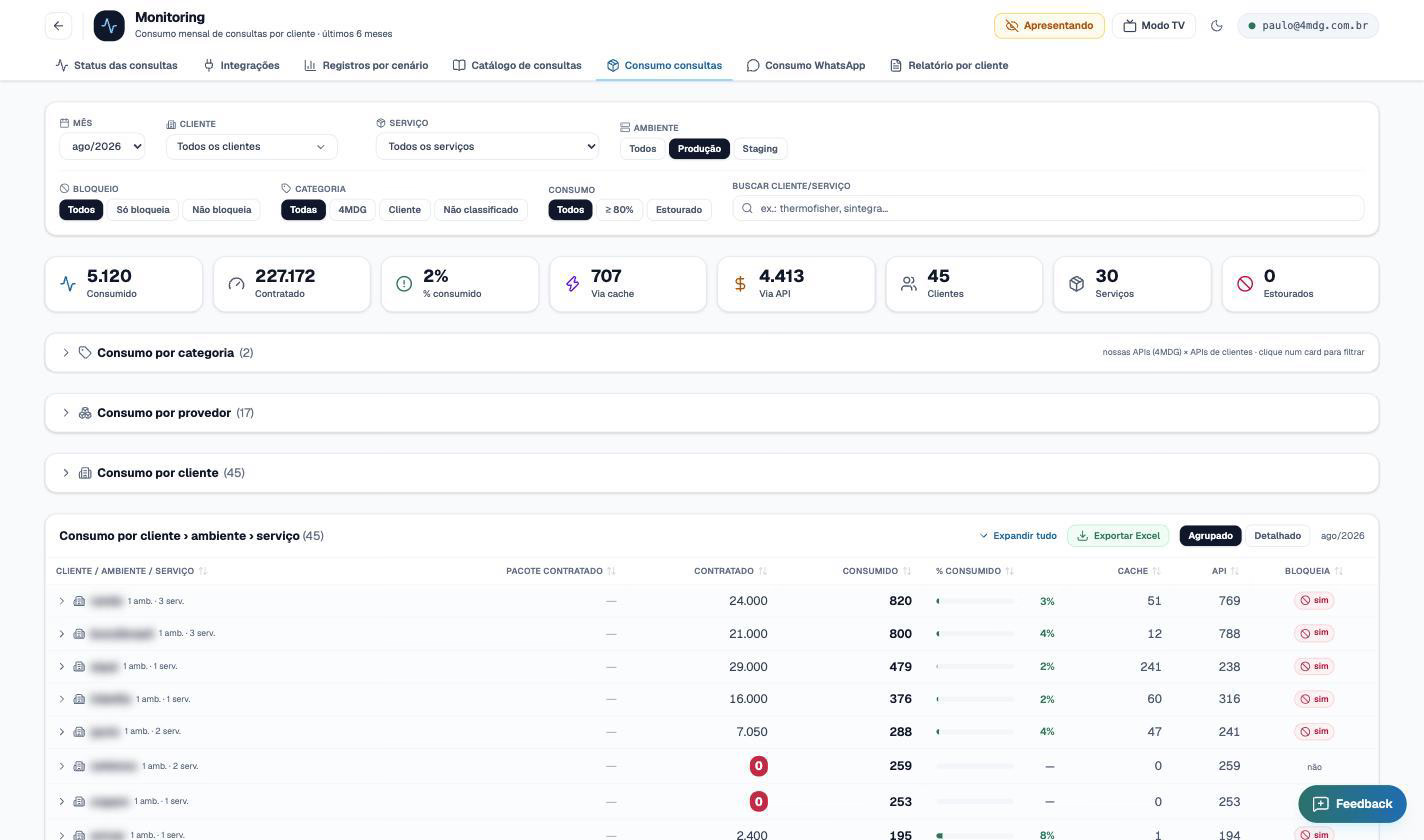
08
Usage vs. contracted
Usage by service over recent months, with overrun alerts before the package blocks.
Account health
Health score composed of usage, support, engagement and sentiment, reviewed week by week with written justification.
Agreed cadence
Check-in, feedback, journey and renewal meetings with defined frequency and minutes recorded in the account.
Voice of the client
NPS and CSAT campaigns segmented by account health; every detractor response opens a treatment task.
Action before the complaint
Accounts with no interaction for 15 days, health drops and financial pending items trigger an alert and an action plan.
Prisma · CS screens · 1 of 4
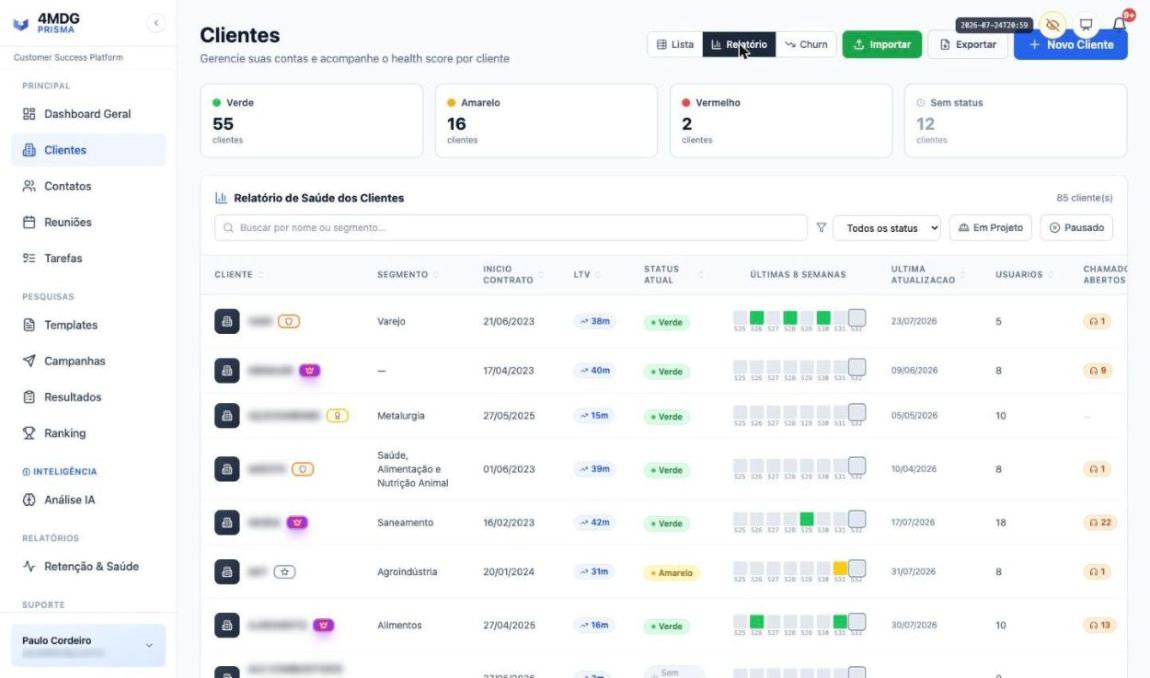
01
Portfolio health report
Eight weeks of health side by side, account by account, with LTV, active users and open tickets. The trend shows up before it becomes a problem.
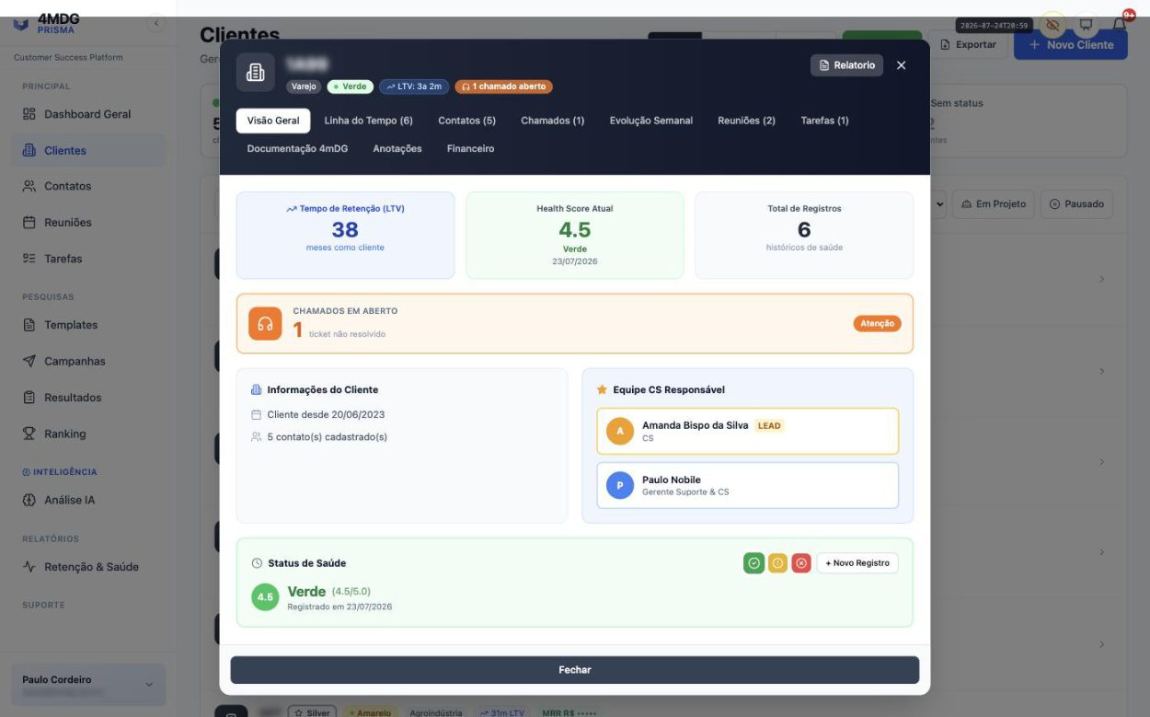
02
Client record
Relationship length, current health score, lead CS and support team, open tickets and the account's full history in one place.
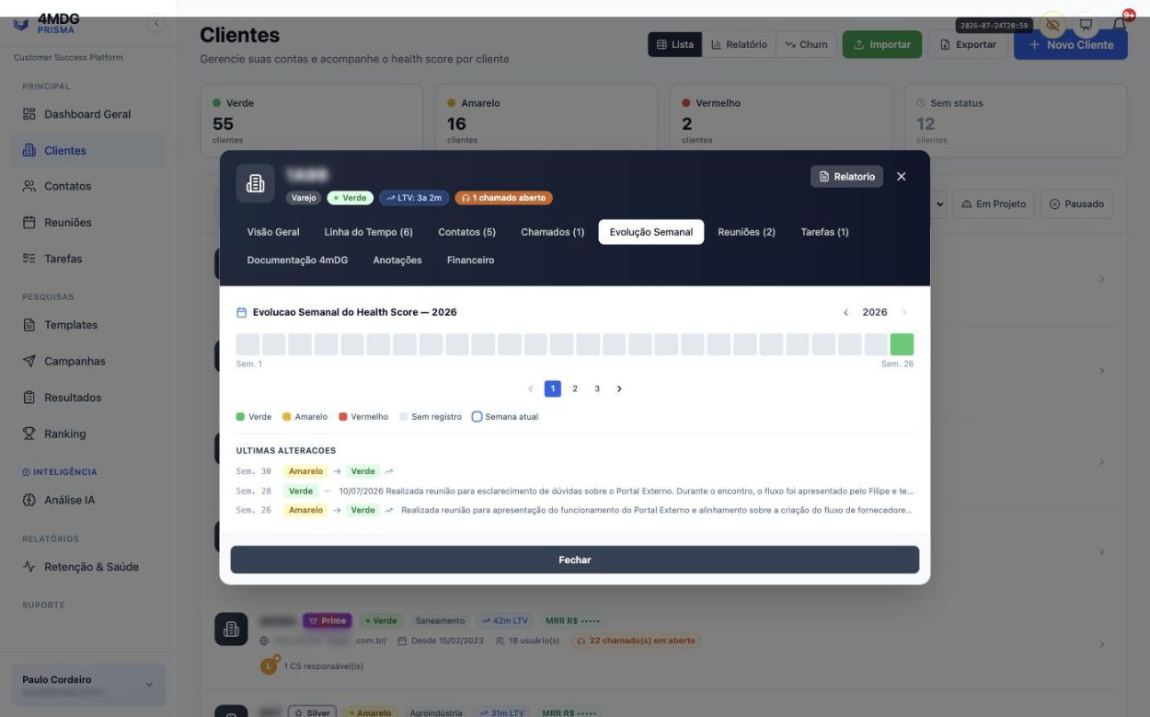
03
Weekly evolution
A year of relationship in one band, with every status transition and a record of what drove the change.
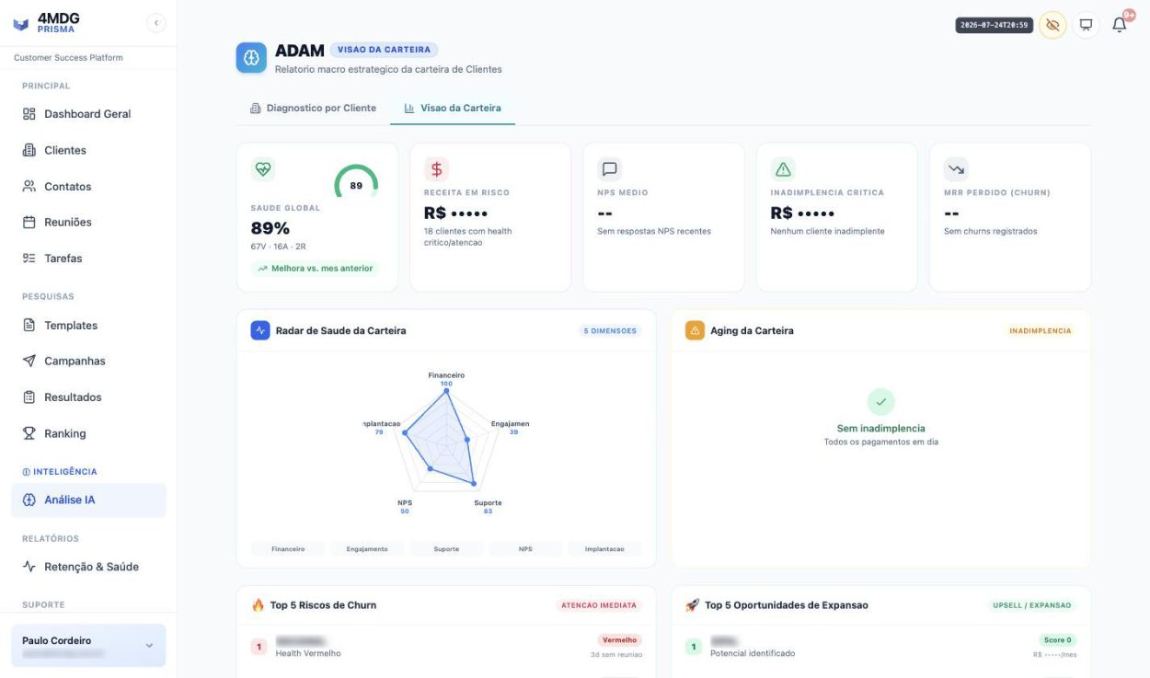
04
Portfolio view with ADAM
Overall health, radar by dimension and portfolio aging. AI cross-references the signals and sets the week's priorities.
Real screens from the internal environment. Client names and values are hidden by presentation mode.
Your account has a lead CS with a name and a support team that knows the context. Meetings scheduled, minutes recorded, open items with deadlines and the health of the relationship measured every week.
Meet the CS teamSupport
Support included in your subscription. And a plan for those who need to keep evolving.
Every client has a support channel, defect resolution and access to new platform features. If your operation is continuously evolving, you can add Enterprise Support, which combines a package of improvements with the service.
Support included
In the monthly plan
Ticket submission and tracking in a dedicated channel, with classification and priority.
Resolution of platform defects and help with questions about usage and configuration.
Maintenance, updates, backup and environment security procedures.
Access to all new platform improvements that are not licensed separately.
Access to the admin portal so your team can create new flows, screens and fields.
Enterprise Support
Add-on purchase
Contracted improvement package: an hour bank for new flows, rule adjustments, new screens and additional integrations, without opening a project for every request.
Priority service, with agreed response times for your operation's critical tickets.
Close CS follow-up, with a defined meeting cadence and periodic account health reviews.
Active monitoring of integrations and query consumption, with alerts before the operation stops.
Contact
Let's design your project with a clear timeline and scope.
Tell us about your scenario and we'll put together a proposal with phases, milestones and an estimated schedule. No commitment.
Av. Queiroz Filho, 1700, Torre E, Conjuntos 715 a 718
Vila Leopoldina, São Paulo, SP, 05319-000
On average, 3 to 6 months to go-live. It all depends on complexity: the number of domains, workflows and integrations, plus your team's availability. Scopes focused on a single domain sit at the lower end of the range; multi-country programs with several ERPs and data cleansing take longer. The detailed schedule is built during the planning phase and approved before execution begins.
No. The build takes place in a staging environment and the switch is planned as a cutover with a defined window, prepared data loads and a smoke test before release.
During the project, we do. After go-live, access to the admin portal lets your team create and adjust workflows, screens, fields and rules without depending on 4MDG, with our support whenever you want.
Progress is visible in real time in Artia, with planned and completed activities and an S-curve. In addition, there is a documented weekly or biweekly status report covering risks, upcoming activities and dependencies.
It is logged and assessed for impact on scope, cost and timeline before being accepted. Nothing changes silently: scope beyond what was contracted becomes a formal proposal, with prior approval.
When contracted, yes, and it runs in parallel with governance. The data is received, the validation flow is presented, standardization is carried out and deliveries happen in batches, with an agreed turnaround time for each one.
Yes. Migration is one of the most frequent scenarios: the data is cleansed and governed before the switch, which avoids carrying the old problem into the new system.
Assisted operation in the first weeks, a closing meeting with lessons learned and a formal transition to the support team, with a signed closure document.
The subscription already includes a ticket channel, bug fixes, environment maintenance and access to new platform features. For operations that are always evolving, there is Enterprise Support, with a contracted improvement package, priority service and close follow-up from CS.